



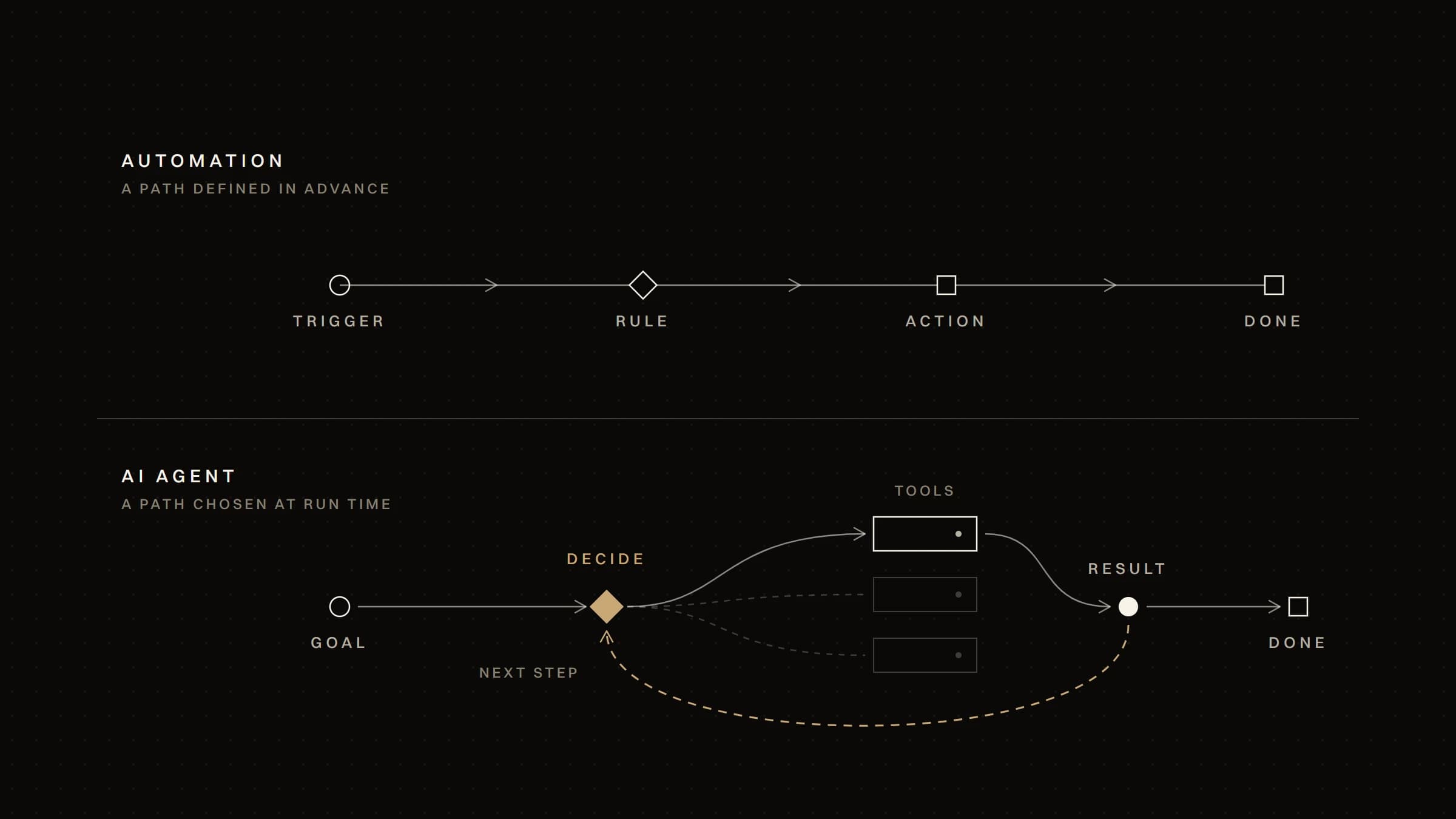
Automation and AI agents both move work through software without someone doing each step by hand. The difference is who decides the next step. In automation, you decide it in advance, as rules. In an agent, a language model decides it while the task runs, within limits you set. That one difference changes how predictable the system is, how it fails, and how closely you have to watch it.
- Automation executes a path you defined. The same input takes the same steps to the same result. It is the right default whenever the rules can be written down.
- An AI agent chooses its path. A language model reads the situation, picks the tool to use next and decides when the task is done. That helps when inputs are unstructured or the steps can't be listed in advance.
- The price of that flexibility is predictability. Agents cost more per run, can take a different route on the same input, and can fail in ways that look plausible. They need limits, logging and review that a rule-based workflow doesn't.
- Most systems that work combine the two. Deterministic automation carries the process; an agent handles the steps that need judgement, inside a narrow scope.
Start with the simplest approach that works, and add an agent only where the rules genuinely run out.
Automation runs a sequence you define: a trigger, conditions and actions. "When an invoice arrives in this inbox, read its total; if it is under the approval threshold, post it to the accounting system and notify finance." Every branch is written by someone before it runs.
That gives automation properties a business can rely on:
- Repeatable. The same input takes the same path every time.
- Testable. You can list the cases and check each one before going live.
- Auditable. When something goes wrong, the log shows which rule fired.
- Inexpensive to run. Steps that are rules need no model call.
Automation isn't limited to simple "if this, then that" tools. Integrations between systems, scheduled data syncs, document generation and reporting are all automation — the territory of business process automation. Its limit is the edge of what you can specify: an input that matches no rule either stops the workflow or, worse, goes down the wrong branch.
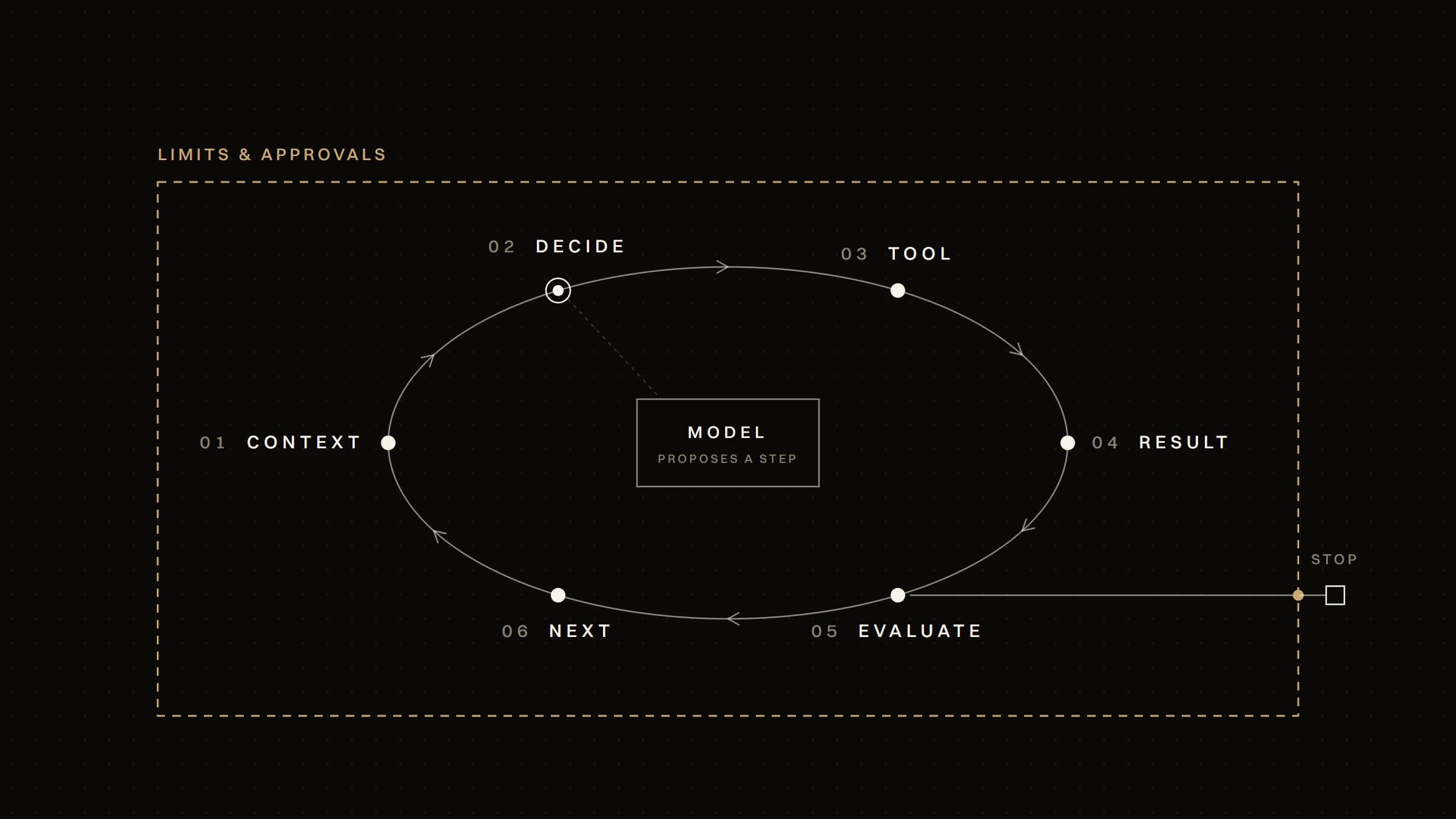
An AI agent puts a language model in charge of the control flow. Instead of following a fixed sequence, it receives a goal, looks at the information available, chooses an action — usually a call to a tool such as a search, a database query or an API — reads the result, and decides what to do next. It repeats that loop until it judges the task complete or reaches a limit.
Anthropic's engineering guide to agents draws the line in the same place. Workflows are "systems where LLMs and tools are orchestrated through predefined code paths"; agents are "systems where LLMs dynamically direct their own processes and tool usage".
So the distinction isn't whether a model is involved. A workflow can call a model to classify an email or summarise a document and still be deterministic in its structure: the model fills in one step, it doesn't choose the steps.
What an agent adds is the ability to handle:
- Unstructured input — a request written in someone's own words, an email thread, a document whose layout varies.
- Steps that depend on what is found — check the order and, depending on what it shows, look up the shipment or the returns policy.
- Open-ended tasks — gather what is needed to answer a question that spans several systems.
What it gives up is the guarantee that the same input produces the same path.
| Automation | AI agent | |
|---|---|---|
| Who decides the next step | The rules you wrote | The model, while the task runs, within its tools and limits |
| Inputs it handles well | Structured and predictable: forms, records, events | Unstructured or variable: free text, documents, open requests |
| Same input, same path | Yes | Not guaranteed |
| What it can do | The actions in its workflow | Whatever its tools allow, in the order it chooses |
| Typical failure | Stops, or takes a wrong branch, on a case nobody foresaw | Finishes with a plausible but wrong result, or takes an action it didn't need |
| How you check it | Test every branch before launch | Evaluate on representative cases, then keep reviewing real runs |
| Running cost | Low and predictable | Higher, and it varies with the number of steps taken |
Automation is deterministic by construction. An agent's path depends on the model's output, which can vary from one run to the next and can change when the model is updated. You can narrow that variation — fewer tools, tighter instructions, structured outputs — but you can't remove it.
Rules need inputs they can parse. If the input is a database row or a form submission, rules are enough. If it is a customer writing in their own words, or a supplier document in a format you haven't seen before, rules either multiply without end or miss cases. That is where a model earns its place — sometimes as a single step inside a workflow, sometimes as an agent.
In automation, the decisions were made when the workflow was designed; at run time it only evaluates conditions. An agent makes decisions at run time. That is its value — and the reason you have to decide in advance which decisions it may take on its own and which ones a person must approve.
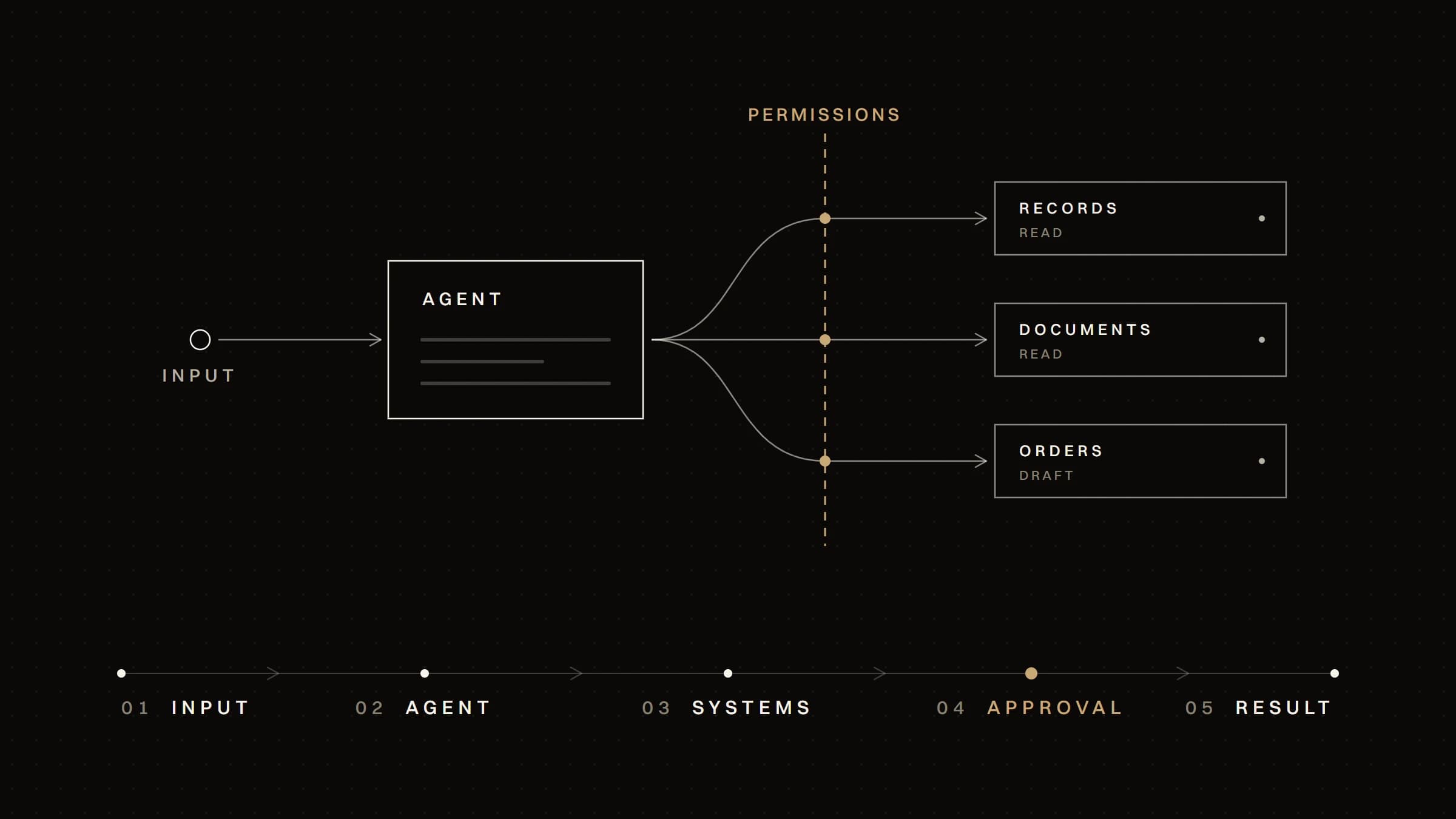
An automation step calls a fixed system with fixed parameters. An agent is given a set of tools and chooses which to call, and with what arguments. Its reach is the sum of its tools' permissions. That is why the OWASP Top 10 for LLM Applications lists Excessive Agency as a risk of its own, traces it to excessive functionality, permissions or autonomy, and recommends limiting the extensions an agent can call "to only the minimum necessary".
A broken workflow usually fails visibly: an error, a stuck item, a missing field. An agent can fail quietly: it finishes, the output reads well, but a figure is wrong or a step was skipped.
Agents also carry a risk that rules don't. Text the agent reads — an email, a web page, a file — can contain instructions that change what it does. OWASP calls this indirect prompt injection. And because each step builds on the last, Anthropic notes that agents' autonomy means "higher costs, and the potential for compounding errors": one wrong early decision carries through every step after it.
For automation, monitoring means an alert when a run fails and a log of what ran. For an agent, it means recording every step — what it read, which tool it called, with which arguments — reviewing samples of completed runs, not only failed ones, and evaluating again whenever the model, the instructions or the tools change.
Choose automation when:
- The rules can be written down, even if there are many of them. Many rules is a maintenance problem, not a reason to use a model.
- The inputs are structured — events from your own systems, forms, records, files in a known format.
- The result must be exactly reproducible, as with most financial, legal or regulated steps, where "usually right" isn't acceptable.
- The volume is high and the value of each run is small, so a model call on every run would add up.
- Someone must be able to explain every outcome afterwards, from the log alone.
A hypothetical example: a shop syncs orders from its online store to its accounting system every hour, and sends a stock alert when an item falls below a set level. Every step is a rule. An agent would add cost and uncertainty, and solve nothing.
Consider an agent when:
- The input arrives in natural language or in varying formats, and has to be interpreted before anything can happen.
- The steps depend on what is found along the way, and listing every path in advance isn't realistic.
- A reviewed draft is valuable — the agent prepares, and a person confirms.
- Its actions are reversible or low-impact, or a person approves the ones that aren't.
- You can tell whether it's working, because you have, or can collect, examples of correct outcomes to evaluate it against.
A hypothetical example: a support inbox receives questions about orders, deliveries and returns, written however customers write them. An agent reads each message, looks up the order and the relevant policy, and drafts a reply with the facts it found. Refunds above a set amount wait for a person. The interpretation and the lookups are where the agent helps; the money stays behind an approval.
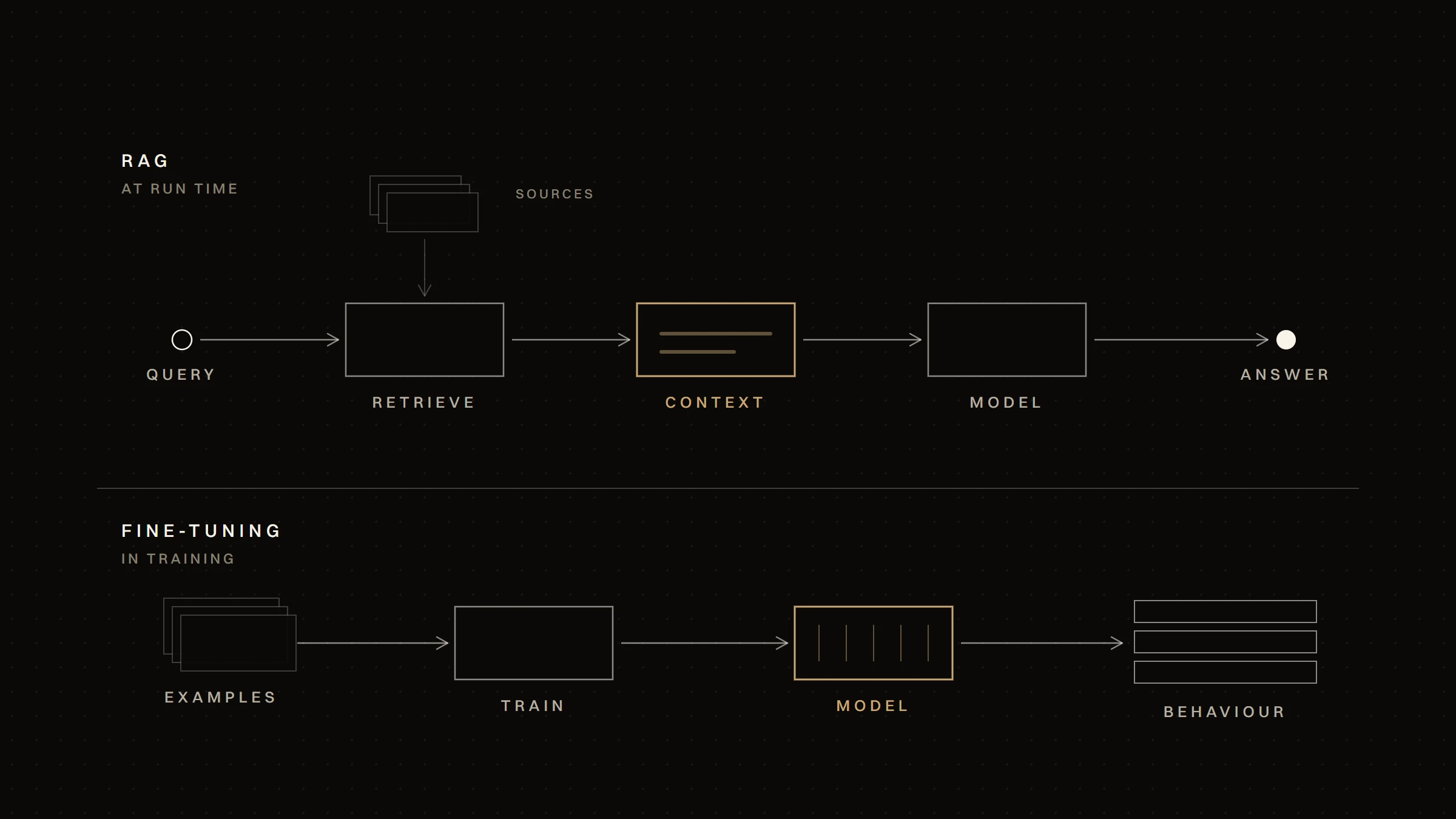
When an agent's answers have to draw on a company's own documents — policies, product data, past tickets — finding the right passages becomes part of the design. That is LLM integration and retrieval-augmented generation (RAG): a separate piece of work from the agent's own loop, with its own evaluation.
The useful question is rarely "agent or automation?" for a whole process. It is which steps need judgement. A common pattern:
- Automation receives and routes. A trigger fires, the input is validated, a record is created.
- An agent handles the judgement step. It classifies, extracts or investigates — inside a narrow scope, with only the tools that step needs.
- Automation takes over again. The agent's output is checked against rules — required fields, allowed values, thresholds — before anything is written to a system of record.
- A person approves what is high-impact, and every run is logged.
A hypothetical example: supplier invoices arrive as PDFs in different layouts. Automation collects them and creates a record. A model step extracts the supplier, the amount and the due date. A rule compares the amount with the purchase order. Only mismatches go to an agent, which looks up the order history and prepares a note for the finance team. Most invoices never reach the agent; the ones that do arrive at a person with the context already gathered.
This is how AI agents that work across business systems are built to hold up: the agent is one component, surrounded by deterministic steps that constrain what it receives and what it can change.
Ask these questions about each step, not about the process as a whole:
- Can the step be written as rules that cover the realistic cases? If so, automate it and stop there.
- Is the difficulty only in reading the input — understanding text, extracting fields? Use a model as one step inside a workflow, and validate its output. You may not need an agent.
- Does the step require choosing between actions based on what is found? Then an agent is a candidate.
- What is the worst action it could take? List its tools and remove any it doesn't need. Put irreversible or costly actions behind a person's approval.
- How will you know it is right? Define test cases and success criteria before building, and decide what you will log and review once it runs.
- Is it worth it? Compare the agent's running and maintenance cost with the work it removes — and with a simpler automation that handles most cases and routes the rest to a person.
If you can't answer questions 4 and 5 yet, the step isn't ready for an agent.
Start from the work, not the technology. Map the process, mark the steps that are already rules, and automate those first: they are cheaper, easier to test and useful straight away. What remains — the steps where people interpret, investigate or decide — is where a model or an agent might help, and those steps are now easier to see and to measure. Anthropic's guide makes the same point in general terms, recommending "finding the simplest solution possible, and only increasing complexity when needed."
Plan for the agent to change. Models are updated, instructions are refined, tools are added. A system in which the agent sits behind clear interfaces and deterministic checks can absorb those changes; a system in which the agent is the process is harder to test and harder to trust.
Keep a person where the stakes are. Human approval isn't a sign that the agent failed. It is part of the design for actions that are costly, irreversible or seen by customers — and OWASP recommends exactly that: "require a human to approve high-impact actions before they are taken."
Automation and AI agents aren't competing options. Automation carries out decisions made in advance; an agent makes some decisions while the task runs. Use automation wherever the rules can be written, a model step where only the reading is hard, and an agent where the path itself depends on judgement — with narrow tools, approval for high-impact actions, and monitoring from the first run. Many systems end up using all three, each where it fits.
Checked on 2 October 2026.